TD

External memory for AI agents working across context windows.

When an agent's context ends, its memory ends. TD captures structured work state—completed work, remaining tasks, key decisions, and uncertainties—so the next session resumes exactly where the previous one stopped.

No hallucinated progress. No lost decisions. No repeated work.

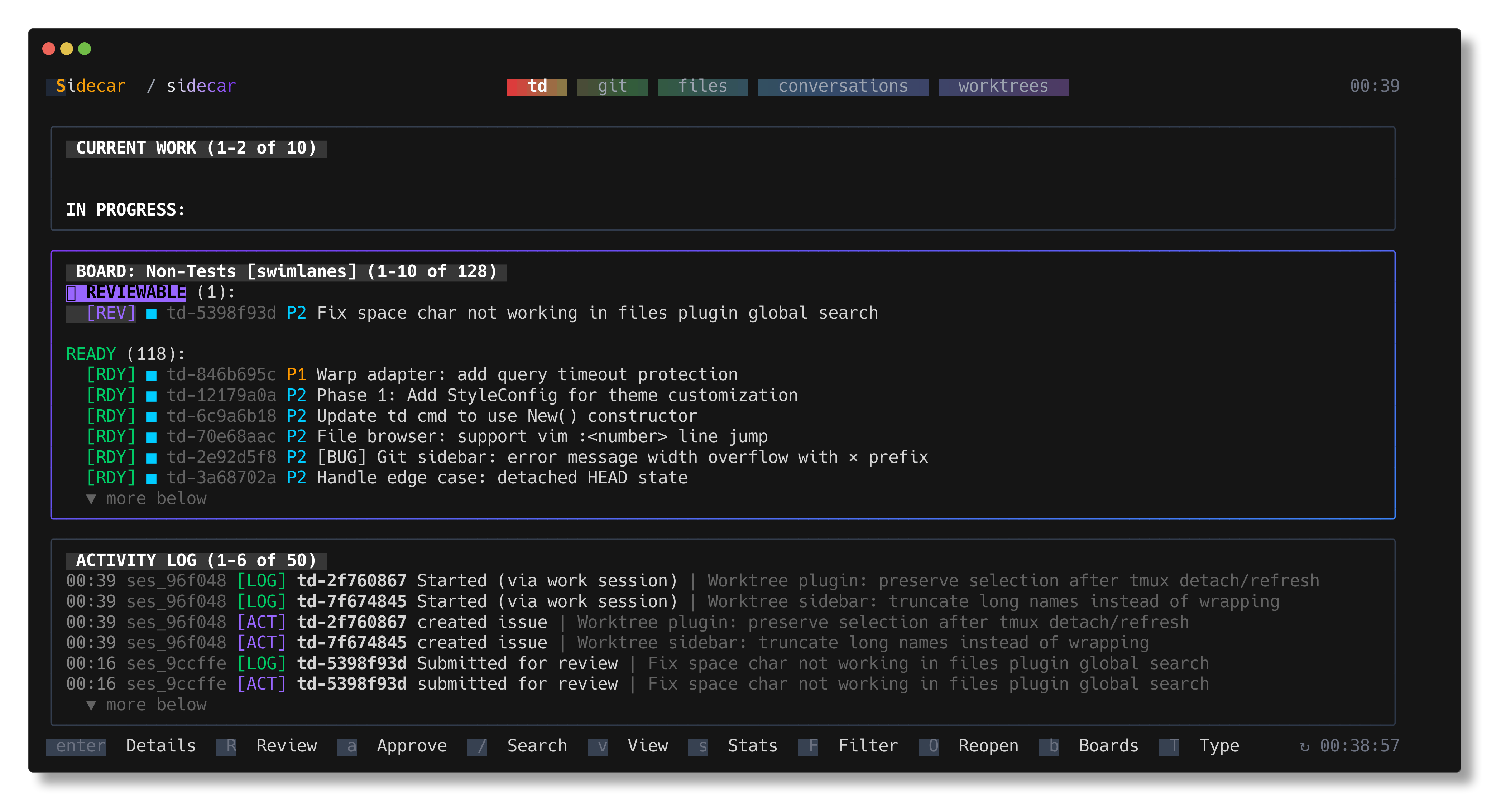
TD Monitor in Sidecar

Why Task Management for AI Agents?

AI coding agents face a fundamental constraint: context windows reset between sessions. Without external memory:

  • Agents hallucinate state — guess what's complete vs. pending
  • Decisions are lost — "why did we choose X over Y?"
  • Work gets repeated — re-implement already-completed features
  • Handoffs break — no structured way to pass context forward

TD solves this with persistent, structured memory via a local SQLite database:

FeatureBenefit
Structured handoffsNext session knows exact state (no guessing)
Decision logsPrevent re-litigation of architectural choices
Dependency trackingManage multi-issue workflows and blockers
Review workflowsEnforce separation between implementation and approval
File trackingMonitor what changed during work sessions
Session identityBranch + agent scoping for consistent context

Built for: Claude Code, Cursor, GitHub Copilot, and AI coding assistants.

View source on GitHub →

Installation

go install github.com/marcus/td@latest

Requirements: Go 1.21+

Initialize TD in your project:

cd your-project/
td init

This creates .todos/db.sqlite (automatically added to .gitignore).

Quick Start for AI Agents

Add to your CLAUDE.md or agent configuration:

# Agents: Mandatory: use td usage --new-session to see open work.

# Agents: Before context ends, ALWAYS run:
td handoff <issue-id> --done "..." --remaining "..." --decision "..." --uncertain "..."

Start of every session:

td usage --new-session   # View current state, see assigned work

Before context window ends:

td handoff td-abc123 \
--done "Completed items" \
--remaining "Pending work" \
--decision "Why we chose this approach" \
--uncertain "Open questions"

This structured handoff ensures the next agent or human session has complete context.

Core Concepts

Sessions

Every agent or terminal gets a unique session ID scoped by git branch + agent type. The same agent on the same branch maintains consistent identity across context resets.

td whoami                    # Show current session identity
td usage --new-session # Start fresh session, view current work
td session "feature-work" # Name current session

TD auto-detects: Claude Code, Cursor, GitHub Copilot, or manual terminal.

Issues

Structured work items with types, priorities, and state tracking:

td create "Implement OAuth2 authentication" --type feature --priority P1

Types: feature, bug, chore, docs, refactor, test Priorities: P0 (critical), P1 (high), P2 (medium), P3 (low)

Issue Lifecycle

State machine with enforced transitions prevents invalid workflows:

open → in_progress → in_review → closed
↓ ↑
blocked ──────────┘ (reject)

Critical constraint: The session that implements code cannot approve it. This enforces review separation—human or different agent session required.

Epics and Dependencies

Model complex work hierarchies:

td epic create "Authentication system" --priority P0
td create "OAuth flow" --parent td-abc123
td dep add td-xyz789 td-abc456 # Issue depends on another
td critical-path # Show optimal work sequence

Essential Commands

Creating and Starting Work

# Create issues
td create "Add OAuth2 support" --type feature --priority P1
td epic create "Authentication system" --priority P0

# Start working
td start <issue-id> # Begin work (open → in_progress)
td focus <issue-id> # Set current working issue
td next # Show highest priority open issue

Tracking Progress

td log "Implemented callback endpoint"
td log --decision "Using JWT - stateless scaling"
td log --blocker "Waiting for API key from ops team"

Review Workflow

# Submit for review
td review <issue-id> # Moves to in_review state

# Review others' work (different session required)
td reviewable # List issues awaiting review
td context <issue-id> # View handoff state
td approve <issue-id> # Approve and close
td reject <issue-id> --reason "Missing error handling"

Querying and Searching

# Simple queries
td list # All open issues
td list --status in_progress # Filter by status
td show <issue-id> # Full details
td search "authentication" # Full-text search

# Advanced queries
td query "status = in_progress AND priority <= P1"
td query "type = bug AND labels ~ security"
td query "rework()" # Rejected, needs rework
td blocked # All blocked issues
td ready # Open issues by priority

Dependencies

td dep add <issue> <depends-on>  # Create dependency
td depends-on <issue> # What does this depend on?
td blocked-by <issue> # What's waiting on this?
td critical-path # Optimal work sequence

Structured Handoffs

The handoff command is TD's most powerful feature. It captures complete context for the next session:

td handoff td-a1b2 \
--done "OAuth callback endpoint, token storage, login UI" \
--remaining "Refresh token rotation, logout endpoint, error states" \
--decision "Using httpOnly cookies instead of localStorage - more secure against XSS" \
--uncertain "Should we support multiple active sessions per user?"

What Handoffs Solve

Without structured handoffs, agents hallucinate progress and forget decisions. With handoffs:

  • Next session knows exact state (no guessing)
  • Decisions are logged (prevents re-litigation of "why did we do it this way?")
  • Uncertainties are captured (humans or next agents can address)
  • Git state is recorded (automatic SHA tracking)

Handoff Fields

FieldPurposeExample
--doneCompleted and tested work"API endpoint, auth middleware, tests"
--remainingSpecific pending tasks"Error handling, rate limiting, docs"
--decisionWhy this approach was chosen"Using JWT over sessions - stateless scaling"
--uncertainOpen questions"Should tokens expire on password change?"

Accepts multiple formats:

# Flags (repeatable)
td handoff td-a1b2 --done "Item 1" --done "Item 2"

# From file
td handoff td-a1b2 --done @completed.txt

# From stdin
cat tasks.txt | td handoff td-a1b2 --remaining -

# YAML via stdin
td handoff td-a1b2 << EOF
done:
- OAuth flow complete
- Tests passing
remaining:
- Token refresh
- Logout endpoint
decisions:
- Using httpOnly cookies for security
uncertain:
- Multi-session support strategy
EOF

Workflow Examples

Single Issue Workflow

Session 1 (Agent): Start work

td usage --new-session        # See current state
td start td-a1b2
td log "Set up OAuth provider config"
td log --decision "Using Auth0 - better docs, existing integrations"
td handoff td-a1b2 \
--done "Provider setup, environment config" \
--remaining "Callback endpoint, token validation" \
--uncertain "Should we support refresh token rotation?"

Session 2 (Agent): Continue

td usage --new-session        # Resume context
td context td-a1b2 # Review previous handoff
td log "Implemented callback endpoint"
td link td-a1b2 src/auth/*.go
td review td-a1b2 # Submit for review

Session 3 (Human or different agent): Review

td reviewable                 # List pending reviews
td context td-a1b2 # Read full handoff
td files td-a1b2 # Check modified files
td approve td-a1b2 # Approve and close

Bug Fix with Full Context

# Create and investigate
td create "Login fails on expired tokens" --type bug --priority P0
td start td-bug123
td log "Reproduced: race condition in token refresh"
td log --decision "Adding mutex around refresh logic"

# Link relevant files
td link td-bug123 src/auth/refresh.go src/auth/middleware.go

# Handoff with uncertainty
td handoff td-bug123 \
--done "Root cause found, mutex added, tests passing" \
--remaining "Integration test, deployment verification" \
--uncertain "Should we add circuit breaker for auth service?"

Parallel Work with Sidecar Workspaces

TD integrates with Sidecar's workspace management for parallel development:

# In Sidecar:
# 1. Press 'n' - create workspace for feature branch
# 2. Press 't' - link TD task to workspace
# 3. Agent works in workspace, tracks with TD
# 4. Press 'r' - review in original workspace (different session)

This workflow ensures clean separation: implementation session cannot approve its own work.

Live Monitoring

Standalone TUI

td monitor

Interactive dashboard with:

  • Real-time task visualization by status
  • Board view with swimlanes (open, in_progress, in_review, blocked)
  • Full-text search and filtering
  • Statistics modal
  • Keyboard navigation

Sidecar Integration

Sidecar's TD Monitor plugin provides seamless integration:

  • View all issues without leaving your editor
  • Submit reviews directly (r)
  • Navigate to issue details (enter)
  • Real-time refresh on file changes
  • Synchronized with Sidecar's workspace management

Open TD Monitor: press t in Sidecar's main view.

Advanced Features

TDQ Query Language

Powerful filtering with SQL-like expressions:

td query "status = in_progress AND priority <= P1"
td query "type = bug AND labels ~ auth"
td query "assignee = @me AND created >= -7d"
td query "rework()" # Rejected issues needing rework
td query "stale(14)" # No updates in 14 days

Operators: =, !=, ~ (contains), <, >, <=, >=, AND, OR, NOT

File Tracking

Link files to issues and track changes:

td link td-a1b2 src/auth/*.go   # Record file SHAs
td files td-a1b2 # Show status: [modified], [unchanged], [new]

Status indicators show what changed since linking, helping reviewers focus on modified files.

Boards

Query-based boards for organizing work:

td board create "Sprint 3" --query "labels ~ sprint-3"
td board show sprint-3

Boards update dynamically as issues match queries.

Work Sessions

Group multiple issues under one work session:

td ws start "Auth refactor"
td ws tag td-a1b2 td-c3d4 # Auto-starts issues
td ws log "Shared migration" # Log to all tagged issues
td ws handoff # Handoff all issues, end session

Configuration

Zero-config by default. Optional environment variables:

VariablePurposeDefault
TD_SESSION_IDForce specific session IDAuto-detected
TD_ANALYTICSDisable usage analyticstrue

Data Storage

Local-first: All data in .todos/db.sqlite. No cloud services, no sync, no accounts.

.todos/
├── db.sqlite # All issues, logs, handoffs, sessions
└── sessions/ # Per-branch session state

Privacy: TD never transmits data externally. Everything stays on your machine.

Learn More

Source and Documentation:

Philosophy: Local-first, minimal, CLI-native, agent-optimized. TD never transmits data externally—everything stays on your machine.