Conversations Plugin
Browse, search, and inspect past AI coding sessions across multiple agent providers with turn-based organization, token analytics, and one-key resumption.
The Conversations plugin is disabled by default. When disabled, Sidecar does not construct history adapters or read agent session stores from your disk.
Enable in ~/.config/sidecar/config.json:
{
  "features": {
    "flags": {
      "conversations_plugin": true
    }
  }
}
Or run: sidecar --enable-feature=conversations_plugin
Supported Agents & Adapters
The Conversations plugin automatically parses and normalizes session histories from:
| Agent | Icon | Provider |
|---|---|---|
| Claude Code | ◆ | Anthropic CLI agent |
| Codex | ▶ | OpenAI coding agent |
| Cursor CLI | ▌ | Cursor background agent |
| Gemini CLI | ★ | Google terminal agent |
| OpenCode | ◇ | Open-source terminal assistant |
| Pi | 🐾 | Pi agent (OpenClaw) |
| Amp Code | ⚡ | Amp coding assistant |
| xAI Grok | ✕ | Grok developer CLI |
| Kiro | κ | Amazon AI assistant |
| Warp | » | Warp terminal AI |
| GitHub Copilot CLI | ⋮⋮ | GitHub Copilot assistant |
Key Capabilities
- Unified Session Index: Aggregates sessions across all supported CLI tools into one chronological list.
- Search & Filter (
/,f): Search across session titles, prompt content, and response text, or filter by project. - Turn-by-Turn Message View: Expand user prompts, agent thoughts, tool invocations, and command outputs.
- Exact Session Resumption: Resumes sessions using structured command vectors (
agentcatalog) to reopen the exact native conversation. - Export to Markdown (
y): Copy full conversation logs to your system clipboard formatted as clean Markdown.
Layout & Navigation
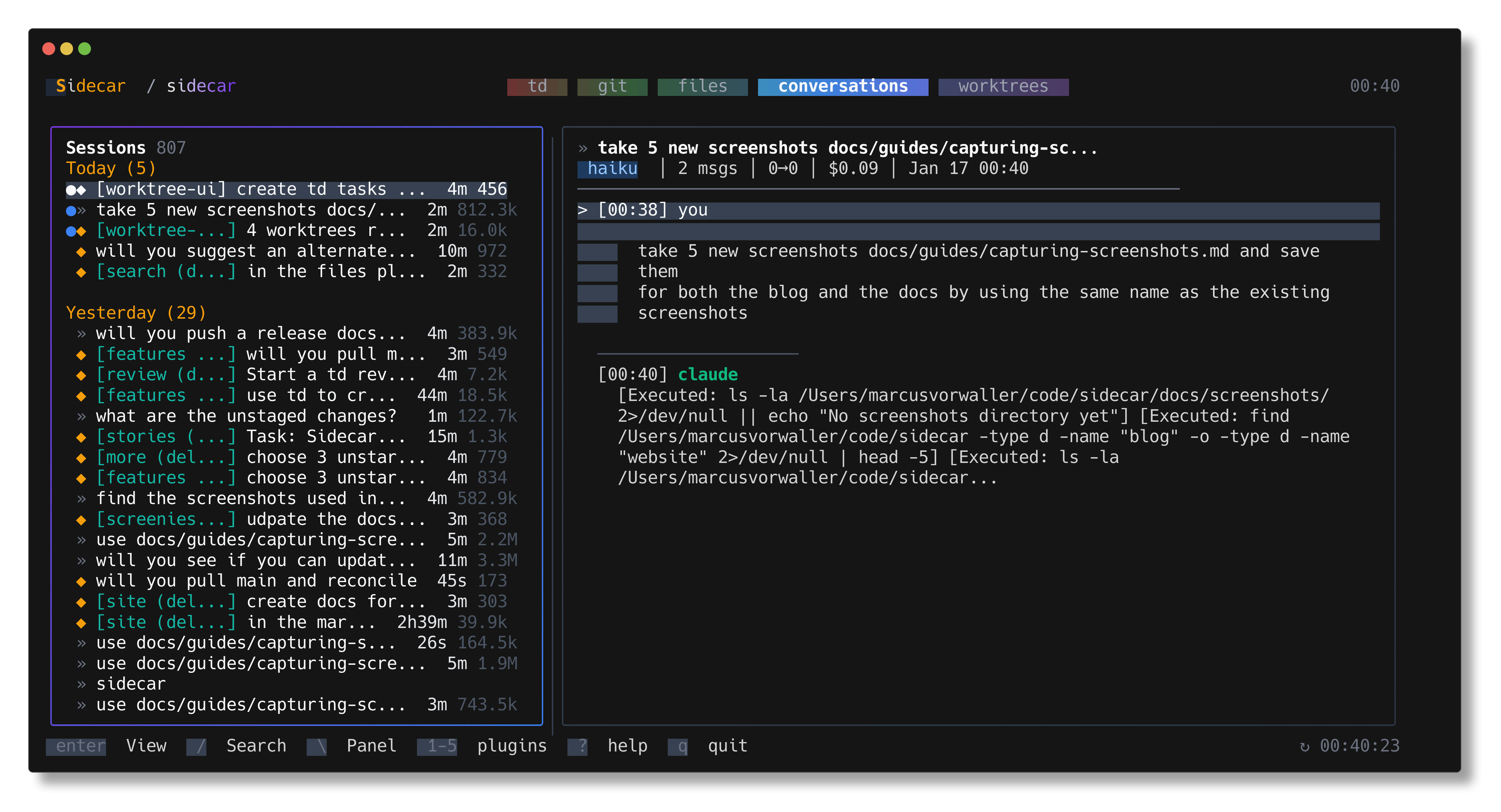
The Conversations plugin provides a two-pane interface:
- Left Pane (Session List): Chronological list of sessions with agent icon, title, relative timestamp, message count, and token usage.
- Right Pane (Message Detail): Formatted conversation transcript with expandable tool calls.
Session List (Left Pane)
| Key | Action |
|---|---|
j, ↓ | Move down session list |
k, ↑ | Move up session list |
g / G | Jump to top / bottom |
ctrl+d / ctrl+u | Page down / Page up |
/ | Search session content and titles |
f | Filter by project |
enter, l | Focus message detail pane |
o | Resume/reopen selected session in CLI |
y | Copy conversation transcript as Markdown |
esc | Clear search or filter |
Message Detail (Right Pane)
| Key | Action |
|---|---|
j, k, ↓, ↑ | Scroll conversation |
ctrl+d / ctrl+u | Page down / Page up |
enter | Expand / collapse selected message turn |
l / r | Toggle between flow view and turn view |
h, esc | Return focus to session list |
Exact Conversation Binding & Resuming
When using Sidecar with provider integration hooks (installed via sidecar agent integration install), running agents automatically report their unique native session ID to Sidecar.
All session resume commands are generated through a centralized structured registry (agentcatalog), ensuring safe argument construction and exact session continuation without guessing.